
Generate a world
Instead of painting from scratch, use the terrain generator to build the terrain automatically. The tabs at the top of the panel choose how land is made. Procedural builds a world from the sliders alone; From Image/Sketch generates terrain over a continent outline you draw or import.
Below is the terrain generator with Terrain Details and Stamp Placement both expanded.
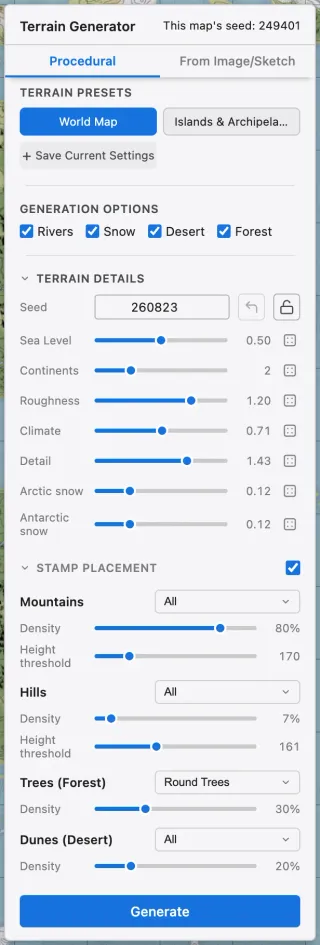
Main controls
Section titled “Main controls”| Control | What it does | Raise | Lower |
|---|---|---|---|
| Sea level | Water-to-land ratio | More ocean, less land | More land; continents and islands emerge |
| Continents | How much land clusters | Clusters into big continents | Breaks into small islands |
| Roughness | Surface ruggedness and detail | Rugged, broken-up terrain | Smooth, gentle terrain |
| Climate | Forest-to-desert ratio | More forest | More desert |
| Detail | Coastline and islet detail | Complex coastlines, more islets | Simpler coastlines, fewer islets |
| Arctic snow | Northern snow extent | Reaches toward the equator | Shrinks toward the pole |
| Antarctic snow | Southern snow extent | Reaches toward the equator | Shrinks toward the pole |
Other controls
Section titled “Other controls”| Element | What it does |
|---|---|
| Overlays | Toggle the river, snow, desert, and forest overlays. |
| Randomize | Sets every slider to a random value. |
| Advanced climates | Adds six extra climates generated by latitude and moisture. |
| Stamp placement | Scatters mountain, hill, tree, and dune stamps as it generates. |
Advanced climates
Section titled “Advanced climates”Basic generation uses five surfaces: water, grassland, forest, desert, and snow. Enabling Advanced climates adds six climates: polar desert, tundra, taiga, savanna, rainforest, and wetland. Each climate can be toggled individually, and they are generated according to latitude and moisture. A disabled climate is replaced by the basic surface that would originally have been there without advanced climates.
Advanced climates is a per-project setting. To paint the climates with the brush, enable the Advanced climates section in the left panel.
Stamp placement
Section titled “Stamp placement”Turn on stamp placement and stamps are scattered to match the terrain as it generates. Four bands are adjusted separately: mountains, hills, trees (forest), and dunes (desert).
| Control | What it does |
|---|---|
| Categories | The dropdown next to each band name chooses which stamp categories to scatter. Several can be selected. |
| Density | Sets how densely stamps are scattered. |
| Height threshold | The height where stamps start to appear. Mountains, for example, are placed only above this value. |
Placing and editing stamps by hand is covered in Stamps.
Every generation uses a seed. Lock a seed to keep the overall shape while you tweak the other sliders, or roll a new one for a completely new world.
The panel also shows this map’s seed, the seed the current map was generated with. Click it to apply that seed again and lock it.
Presets
Section titled “Presets”Save a set of settings you use often as a terrain preset to reuse it. World and Islands ship as built-in presets.
Generate from an image or sketch
Section titled “Generate from an image or sketch”Pick From Image/Sketch in the top tabs to define the continent outline yourself. The terrain presets and the sea-level sliders are replaced by a draft box and a Draw / Edit button.
Pressing Draw / Edit opens the Draw Continents editor.
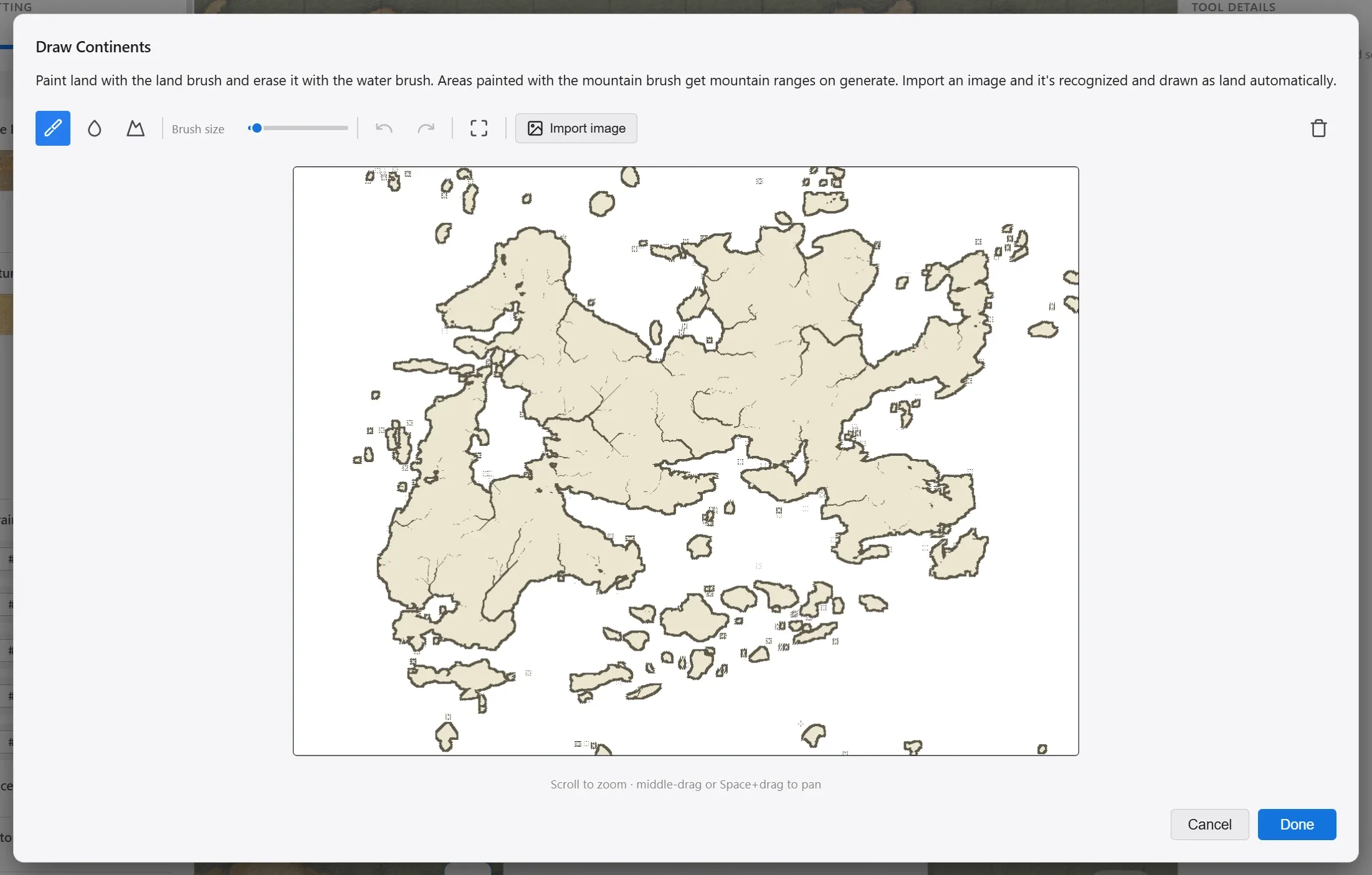
| Element | What it does |
|---|---|
| Land brush | Drag to paint continents. |
| Water brush | Erases painted land. |
| Mountain brush | Paints where a mountain range runs. What you paint becomes land, shown in a darker tone. |
| Brush size | The thickness of the brush. |
| Import image | Loads an image and recognizes the continent outline automatically. Tune the result with the Recognition and Detail sliders, then apply it. You can still refine it with the brushes afterward. |
| Done | Saves the draft and closes the editor. |
Once a draft is ready, two sliders in the generator shape its coastline. Below is the From Image/Sketch tab with a draft in place.
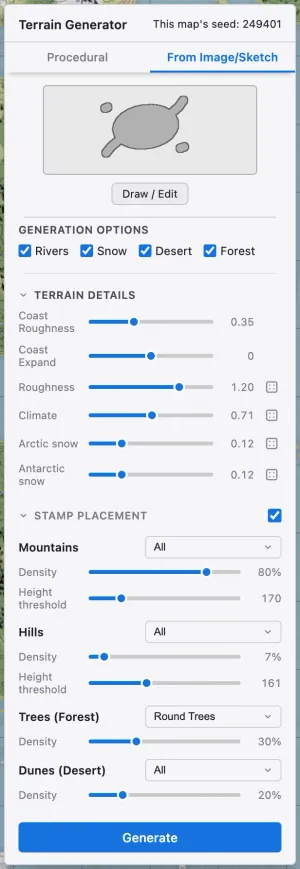
| Control | What it does | Raise | Lower |
|---|---|---|---|
| Coast Roughness | How rough the drawn outline’s coastline becomes | More jagged coastline | Follows the outline exactly |
| Coast Expand | Widens or shrinks the coastline | Land expands outward | Land shrinks inward |
Press Generate and mountains, climate, and stamps are built over the outline you drew. Rolling a new seed keeps the outline and changes only the interior mountains and climate.
Drawing mountain ranges
Section titled “Drawing mountain ranges”Where you paint with the mountain brush, the generated land rises above its surroundings and mountain stamps are placed on it. Painting over it again with the land brush clears the mountain mark and returns it to ordinary land.
The height rises out of the surrounding terrain, so it reads as a range rather than a flat plateau. A thin stroke still spreads naturally into foothills, so one stroke along the ridge is enough. How rugged the range is comes from what you painted, independently of the generator’s sliders.